
Overview
This lesson introduces Quality Center, a centralized workspace within ServiceNow that helps developers monitor, validate, and improve the quality of their platform changes.
Quality Center brings together multiple quality and governance capabilities in a single interface, allowing developers to review their work, run automated checks, and resolve issues before changes are promoted to higher environments.
By combining automated analysis, best-practice guidance, and AI-assisted recommendations, Quality Center helps organizations maintain consistent development standards while reducing technical debt and deployment risks.
Key capabilities available in Quality Center include:
- QC Livecheck – Scan configuration elements or update sets to detect issues.
- Peer Review – Enforce quality validation through review workflows.
- Best Practices Hub – Identify and prevent recurring development issues.
- HealthScan Integration – Import and review ServiceNow HealthScan findings.
- QC Copilot – AI-powered recommendations to help resolve detected issues.
- Release Tracking – Centralized overview of all update sets currently progressing through the development lifecycle
- Instance Tracking – High-level overview of the overall health and stability of the ServiceNow instance.
Together, these features provide developers and administrators with a single environment to analyze, manage, and improve the quality of their ServiceNow development work.
Development Tracking
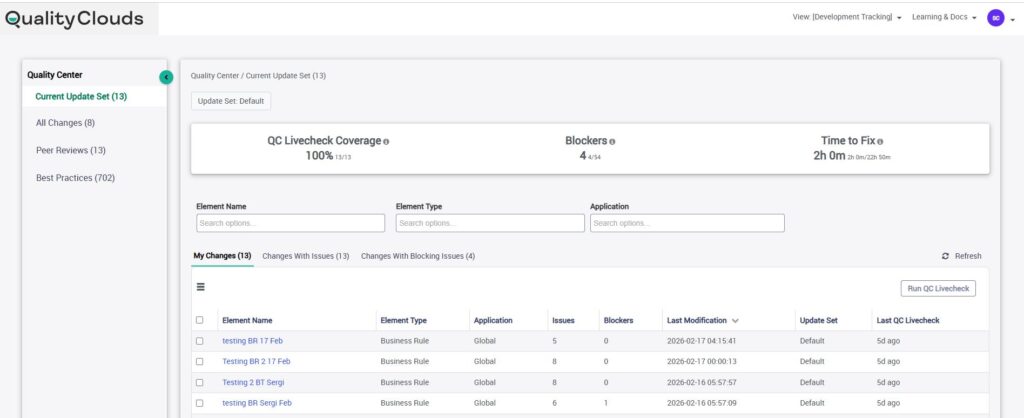
The Development Tracking view is designed as a focused workspace for developers to manage their daily work efficiently.
This view is automatically filtered by the logged-in user, ensuring developers see only the configuration elements and update sets they are actively working on. It allows developers to track all changes made in their update sets and quickly assess the quality of their modifications.
Key capabilities include:
- Tracking all changes in the current update set and other update sets the developer has contributed to
- Running QC Livechecks or instance scans directly from the element view
- Viewing and managing Peer Review requests and their approval status
- Accessing issues detected by LiveChecks, HealthScans, and Instance Scans in a single consolidated view
- Reviewing enriched Best Practices guidance with detailed rule descriptions and thresholds
By combining development activity and quality insights in one place, this view helps developers reduce context switching and resolve issues faster during the development process.
Release Tracking
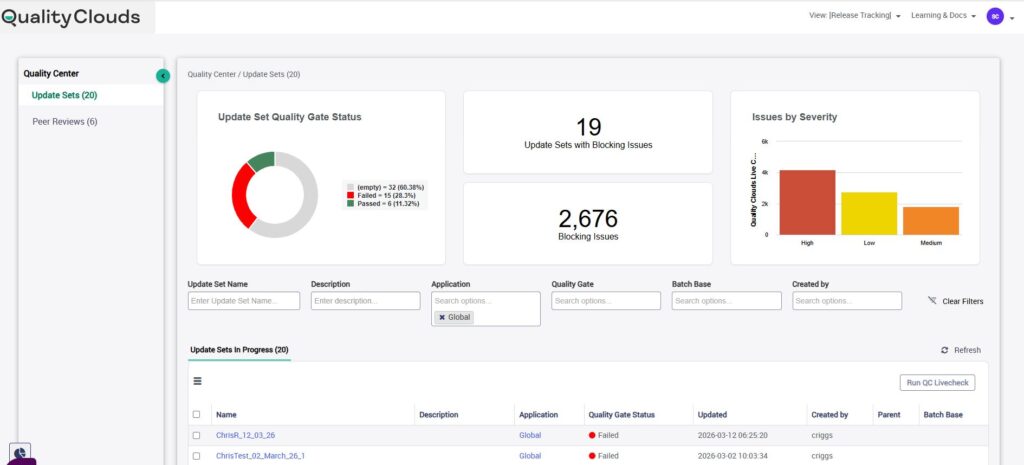
The Release Tracking view provides a centralized overview of all update sets currently progressing through the development lifecycle.
This dashboard allows teams to monitor the quality status of each update set and ensure that releases meet the required governance standards before promotion.
From this view, teams can:
- Monitor release quality and determine which update sets pass or fail the Quality Gate
- Launch QC Livechecks directly from the release dashboard
- Request Peer Reviews for validation before deployment
- Review issues related to each update set through detailed QC pop-up insights
- Access update set KPIs and related lists for full traceability across the release lifecycle
By validating quality before promotion, this view helps ensure that only compliant and well-tested changes are deployed to higher environments.
Instance Tracking
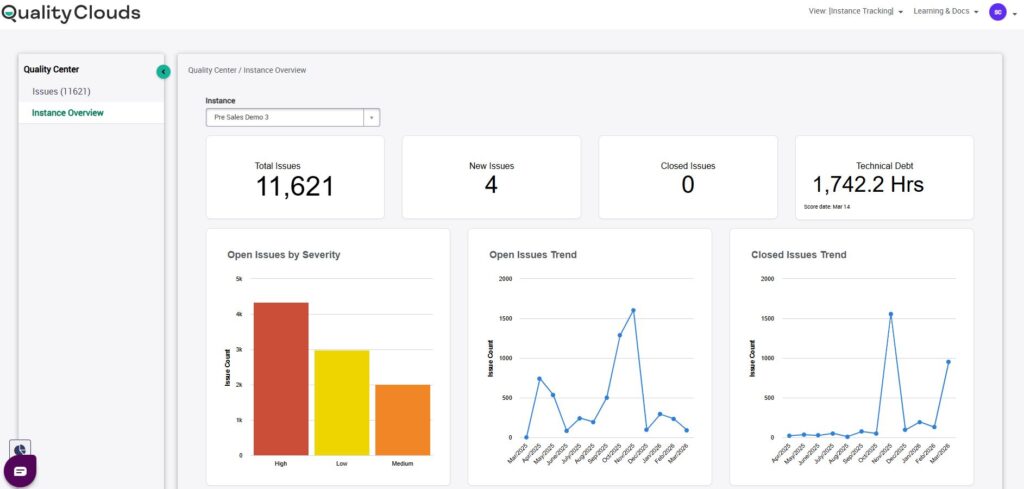
The Instance Tracking view provides a high-level overview of the overall health and stability of the ServiceNow instance.
This dashboard aggregates findings from full platform scans and presents them in a structured way, allowing teams to quickly identify areas that require attention.
Key capabilities include:
- A unified dashboard displaying all Full Scan issues
- Dedicated tabs to filter issues by Open, Written Off, or Closed status
- Instance filtering tools to quickly locate relevant findings
- The Instance Overview tab displaying key instance health KPIs
- Integration with Agile 2.0, allowing users to create Stories or Defects directly from identified issues
By providing a clear picture of platform health, the Instance Tracking view helps organizations detect risks early and maintain long-term platform stability within ServiceNow.
Reviewing Issues in Quality Center
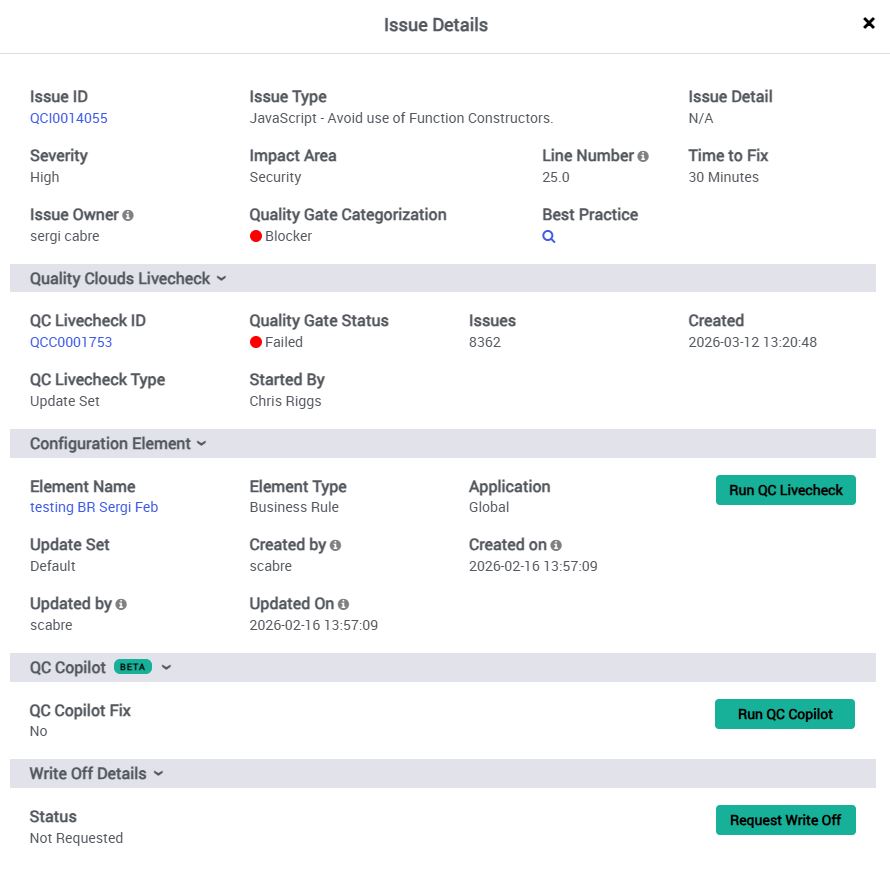
For elements that have been scanned, Quality Center provides a detailed list of issues detected during Livecheck analyses. Each issue includes contextual information to help developers understand and resolve the problem quickly, including:
- Severity and impact area (security, performance, scalability, etc.)
- The exact line of code where the issue occurs
- Quality Gate categorization (Blocker or Minor)
- Estimated time required to resolve the issue
- Links to relevant best-practice documentation
Selecting an issue opens a detailed panel containing information about:
- The issue itself
- The Livecheck that detected it
- The configuration element where it appears
This contextual view allows developers to move quickly from detection to remediation.
QC Copilot
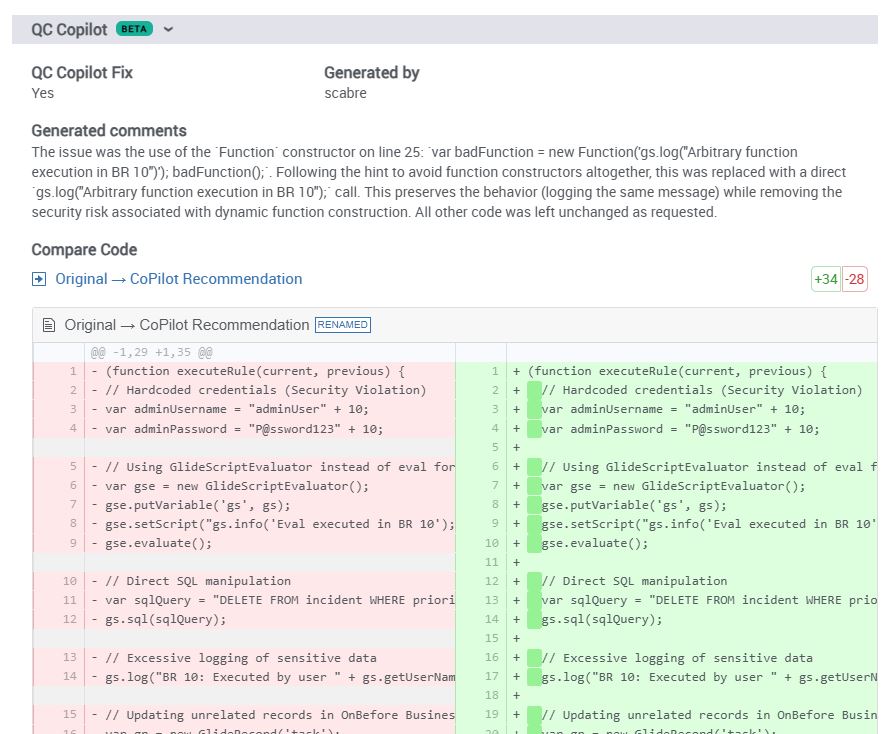
Quality Center also includes QC Copilot Add-on, an AI-powered assistant designed to help developers resolve issues more efficiently.
When an issue is detected, developers can request an AI-generated recommendation that explains the problem and proposes a potential fix. The system provides:
- A description of the issue and its root cause
- Suggested code improvements
- A comparison view between the original code and the recommended changes
This capability helps developers understand issues faster and implement best-practice solutions more efficiently.
Best Practices
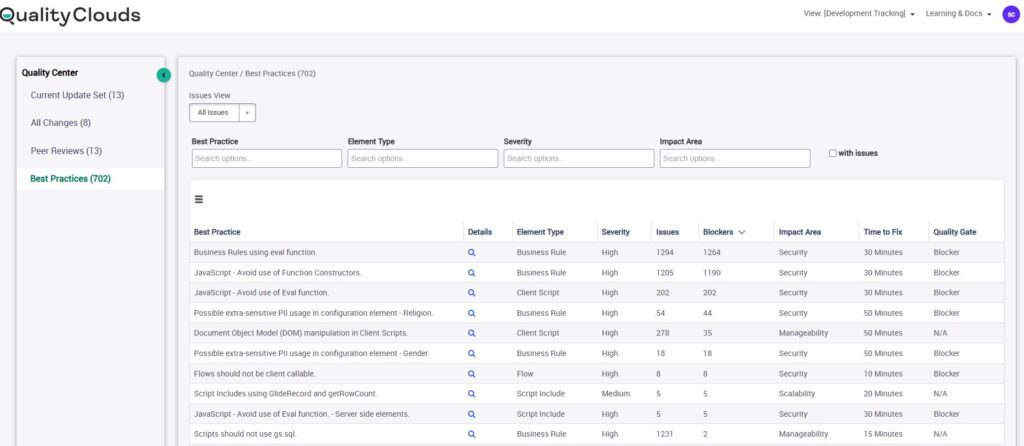
The Best Practices tab provides a centralized catalog of all active development rules and platform guidelines.
These best practices are ranked based on how frequently they are violated, helping teams quickly identify patterns of recurring issues. Each best practice entry includes:
- A description of the rule
- Associated element types
- The number of related issues
- The number of blocking issues
- Severity and impact areas
- Estimated time required to resolve issues
Developers can also review the list of affected elements associated with each best practice, enabling them to locate and resolve problems more quickly.
This view acts both as a quality monitoring tool and a learning resource, helping teams adopt better development practices over time.
HealthScan Integration
Quality Center also supports importing ServiceNow HealthScan reports, allowing organizations to view all platform quality findings in a single location.
Once a HealthScan report is imported, its findings appear alongside Quality Clouds issues within the Quality Center interface. Developers can review these findings when analyzing configuration elements or investigating quality problems.
By consolidating HealthScan results and Quality Clouds analysis, Quality Center becomes a unified workspace for managing platform quality and governance.
Unified Quality Workspace
Together, the Development Tracking, Release Tracking, and Instance Tracking views provide a complete perspective on development activity, release readiness, and platform health.
By consolidating quality insights, issue management, and governance controls into a single workspace, Quality Center enables teams to:
- Detect issues earlier in the development lifecycle
- Ensure releases meet governance standards before deployment
- Maintain visibility into overall instance health
- Continuously improve platform quality over time
Quality Center ultimately helps organizations build more reliable, maintainable, and well-governed ServiceNow platforms.