This lesson introduces the core capabilities of Quality Clouds that help organizations monitor platform health, enforce governance, and maintain high development standards across ServiceNow environment.
Quality Clouds combines automated analysis, development validation, and governance workflows to support teams throughout the entire development lifecycle.
The following capabilities form the foundation of the platform.
Platform Scan
Platform Scans provide a comprehensive analysis of the entire platform environment, allowing organizations to assess overall quality, technical debt, and potential risks across their ServiceNow Instances.
Platform Scans evaluate the full codebase and configuration of the platform. This allows teams to obtain a complete picture of platform health and identify issues that may affect maintainability, security, performance, or governance.
Platform Scans generate detailed findings that feed into QC Views, analytics dashboards, and governance workflows, enabling teams to monitor trends, track remediation progress, and prioritize improvement efforts.
By running Platform Scans regularly, organizations can maintain continuous visibility into their platform quality and ensure that their environments remain stable, secure, and aligned with best practices.
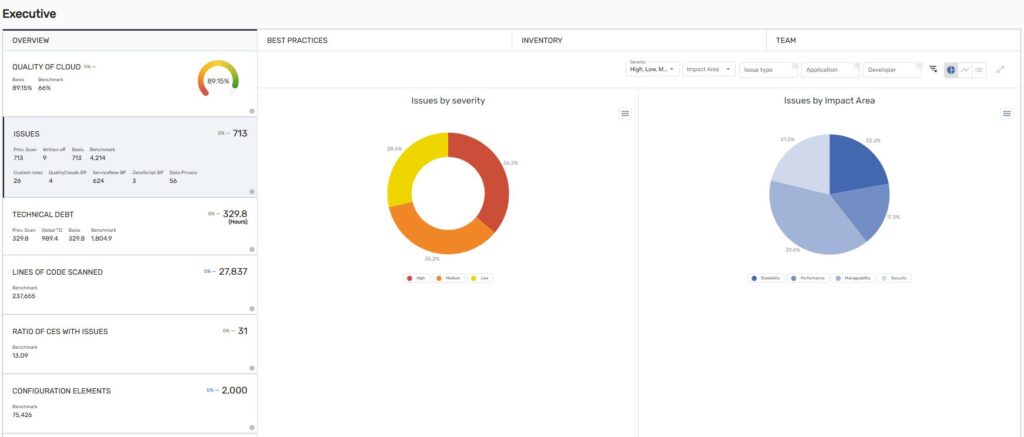
QC Views for Reporting, Analytics and Metrics
Quality Clouds provides a wide range of QC Views that allow teams to monitor platform health, analyze trends, and track technical debt over time. These dashboards offer visibility into key metrics such as:
- Technical debt evolution
- Code quality trends
- Development activity
- Risk areas across the platform
- AI readiness and governance insights
By transforming technical findings into clear visual reports, QC Views help architects, platform owners, and leadership teams understand platform quality and prioritize improvement efforts.
QC Livecheck
QC Livecheck enables teams to validate quality during development by running automated checks against platform best practices.
It allows developers to detect issues early and ensure that changes comply with governance policies before progressing through the development lifecycle.
Livechecks can be executed at different levels depending on the scope of the changes being validated.
Livecheck on Configuration Elements
Livechecks can be executed on individual configuration elements, allowing developers to validate specific components while they are being developed.
This provides immediate feedback on code quality and best-practice compliance. In ServiceNow, configuration elements include:
- Server-side logic (e.g., Business Rules, Script Includes, Script Actions)
- Client-side behavior (e.g., Client Scripts, UI Policies, UI Actions)
- Data model and configuration (e.g., Tables, Dictionary, Transform Maps, System Properties)
- Security and access control (e.g., Access Controls, Security Plugins)
- Integrations and APIs (e.g., REST Messages, Scripted REST APIs, SOAP Messages)
- Service Catalog components (e.g., Catalog Items, Record Producers, Variables)
- Workflows and automation (e.g., Workflows, Flow-related elements)
- UI and experience components (e.g., Widgets, UI Scripts, Form Layouts)
- AI-related components (e.g., AI Agents, AI Skills, AI Tools, AI Prompts, AI Use Cases)
Running Livechecks at this level helps developers identify issues such as performance risks, security vulnerabilities, or coding standard violations before committing their changes.
Livecheck on Update Sets
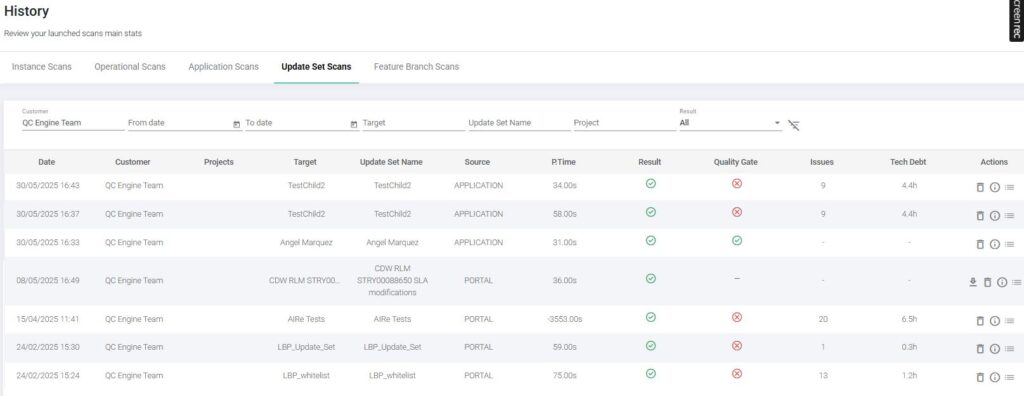
In addition to running Livechecks on individual configuration elements, Quality Clouds also allows you to execute Livechecks on wither child or parent Update Sets.
An Update Set Livecheck analyzes all the configuration elements included in a specific Update Set, providing a consolidated view of the quality impact of the changes before they are promoted to higher environments.
This capability enables teams to:
- Validate the overall quality of a complete set of changes before promotion
- Detect issues across multiple related configuration elements within the Update Set
- Ensure that all changes comply with governance standards and quality gates
By running Livechecks at the Update Set level, teams gain full visibility into the quality of their development work, reducing the risk of promoting issues into test or production environments.
This approach supports a more controlled and reliable release process, ensuring that only compliant and high-quality changes are moved forward in the development lifecycle.
Quality Gates
Quality Gates provide an automated governance mechanism that ensures development changes meet the organization’s defined quality standards before they progress through the development lifecycle.
Quality Clouds analyzes detected issues and classifies them based on severity and impact area. When a change includes issues that violate these policies, the Quality Gate will fail, preventing the change from progressing until the issues are resolved or properly reviewed.
Quality Gates can be applied directly to ServiceNow Instances, ensuring that development quality is validated directly in the platform development workflow.
Configuring Quality Gates
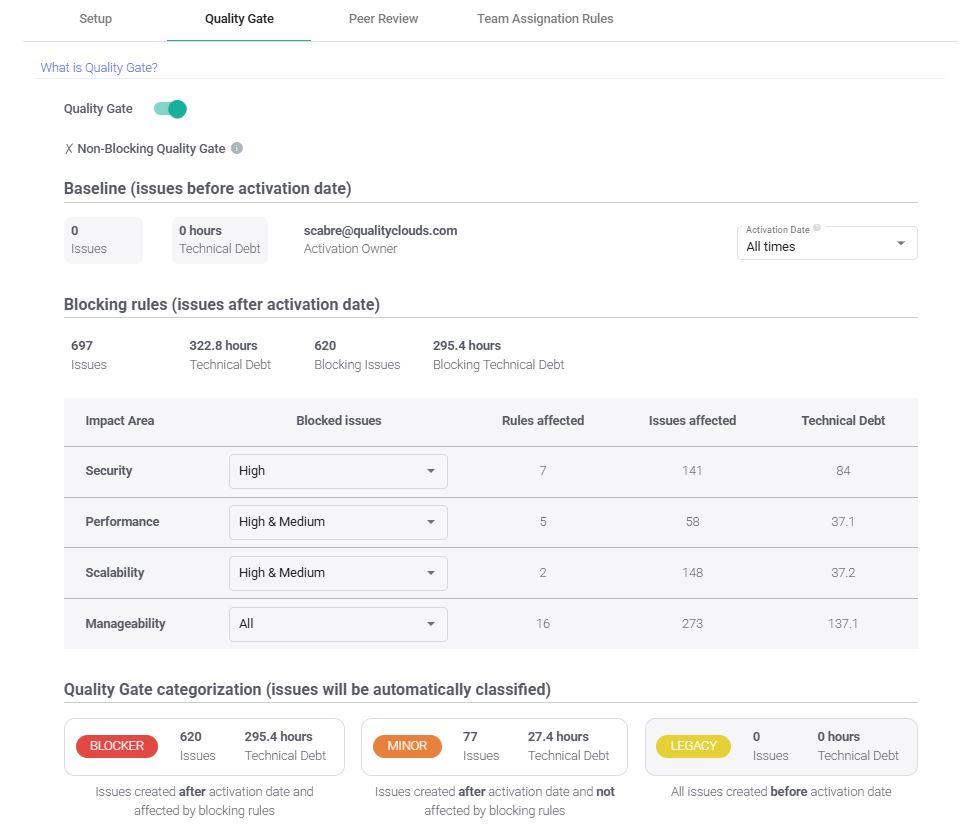
Quality Gates are configured by Customer administrators within the Quality Clouds platform.
Administrators define which types of issues should be considered blocking issues based on the organization’s governance policies. These rules determine which findings must be resolved or reviewed before development changes can be promoted. For example, administrators can configure Quality Gates to block issues such as:
- Security vulnerabilities
- Performance risks
- Scalability problems
- Manageability issues
By defining these policies, organizations can ensure that the most critical issues are always addressed before deployment.
Enforcing Governance
When a scan detects blocking issues, the Quality Gate will fail, indicating that the change does not meet the required quality standards.
This automated validation ensures that non-compliant changes cannot progress through the development pipeline, helping organizations maintain consistent governance, reduce technical debt, and protect production environments.
By embedding Quality Gates into both platform development workflows, Quality Clouds ensures that quality validation is enforced consistently across the entire development lifecycle.
Peer Review process
Peer Review provides a governance mechanism that allows teams to review and validate decisions related to quality issues before changes are promoted across environments.
In Quality Clouds, Peer Review is commonly used as part of the Write-Off process. When a developer identifies an issue that cannot or should not be fixed immediately, they can request to write off the issue, providing a justification for why the issue should be accepted.
The Peer Review process ensures that these requests are properly evaluated by another team member or technical lead before they are approved.
Write-Off Approval Process
When requesting a write-off, the developer provides:
- A write-off reason
- A description explaining the justification
- The affected configuration element or code component
Once submitted, the request enters the Peer Review workflow, where a reviewer can:
- Approve the write-off, accepting the issue as an exception
- Reject the request, requiring the issue to be resolved before the change progresses
This controlled approval mechanism ensures that quality standards remain enforced while still allowing flexibility for justified exceptions.
Governance and Accountability
By introducing Peer Review into the write-off process, organizations ensure that exceptions are reviewed, documented, and approved transparently.
This helps maintain strong governance practices, prevents misuse of issue write-offs, and ensures that quality standards are consistently applied across development teams.
QC Copilot
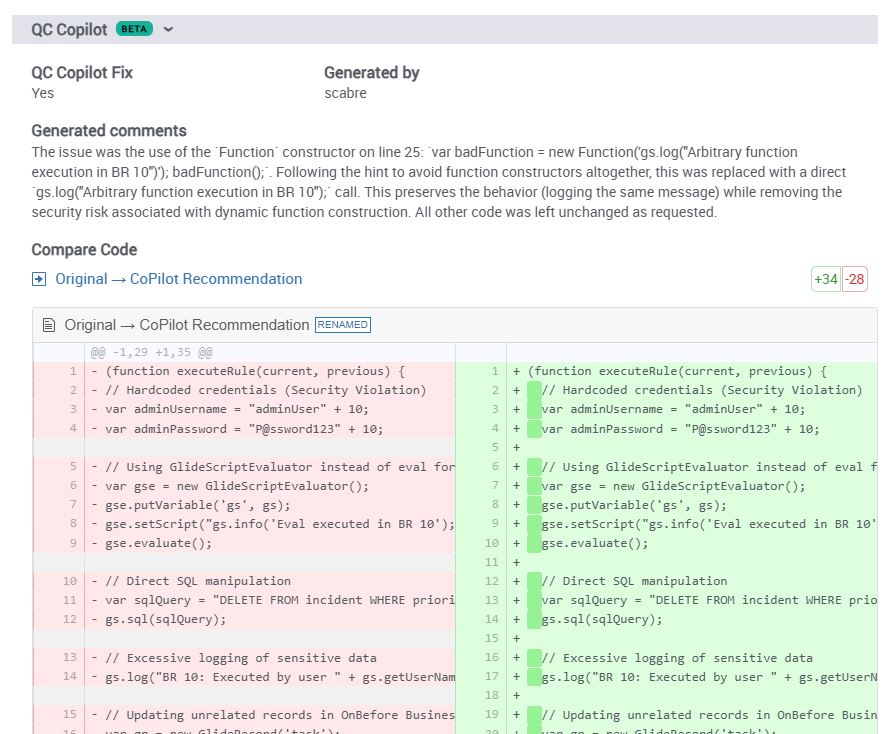
QC Copilot is an AI-powered assistant designed to help developers resolve quality issues more efficiently. When an issue is detected, QC Copilot can generate recommendations explaining:
- The root cause of the problem
- Best-practice guidance
- Suggested code changes to resolve the issue
By accelerating problem resolution, QC Copilot helps developers maintain high quality standards while improving productivity.
Teams Assignation Rules
The Teams capability allows organizations to automatically assign issues detected during scans to the appropriate development or platform team. This ensures that the right team is responsible for addressing the findings and helps streamline remediation efforts across large organizations or multi-team environments.
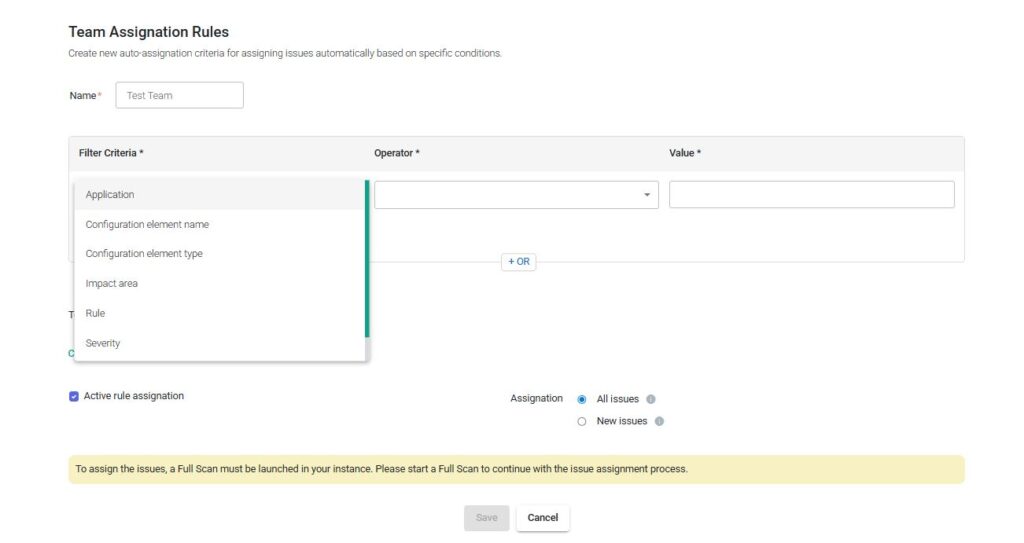
Automatic assignment is configured through Team Assignment Rules, within the Quality Clouds Portal, which allow administrators to define how issues should be routed based on specific criteria.
Team Assignment Rules
Administrators can create rules that automatically assign issues to a team when a scan detects findings that match defined filters. These rules can use different filter criteria, including:
- Application – Assign issues related to a specific application or module to the responsible team.
- Configuration Element Name – Route issues based on specific components or elements name.
- Configuration Element Type – Assign issues based on element types such as Apex Classes, Flows, or Business Rules.
- Impact Area – Route issues based on categories such as Security, Performance, or Scalability.
- Rule – Assign issues triggered by specific best practices.
- Severity – Assign issues based on severity levels such as High, Medium, or Low.
By combining these filters, administrators can create flexible assignment rules that ensure issues are automatically routed to the most appropriate team.
Improving Accountability
Automatic issue assignment helps organizations:
- Clearly define ownership of quality issues
- Accelerate remediation workflows
- Improve collaboration between development teams
- Maintain accountability across large platform environments
This capability is especially valuable during Full Platform Scans, where a large number of issues may be detected and need to be distributed efficiently across multiple teams.
Quality Center
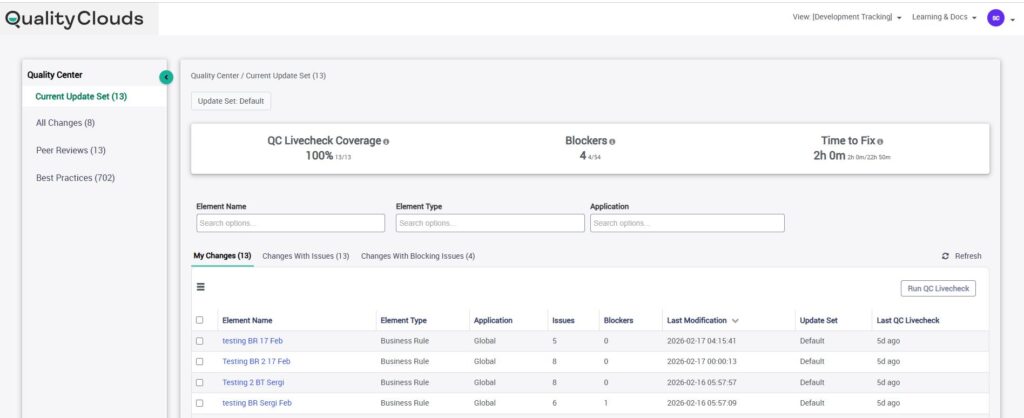
Quality Center provides a centralized workspace where ServiceNow developers can monitor their work, validate quality, and manage issues during the development process.
Quality Center can be accessed directly within the ServiceNow Instance, in the Quality Clouds menu.
By bringing quality insights closer to the development environment, Quality Center enables developers to review their changes, run validations, and address issues without switching between multiple tools
Key Capabilities
Quality Center provides several capabilities designed to help developers maintain high-quality development standards, including:
- Running QC Livechecks on configuration elements during development
- Reviewing detected issues and understanding their impact
- Accessing Best Practice documentation to guide issue resolution
- Tracking configuration elements that have been modified
- Managing write-off requests and Peer Review approvals
These capabilities allow developers to validate their work continuously and ensure that changes comply with the organization’s quality standards.