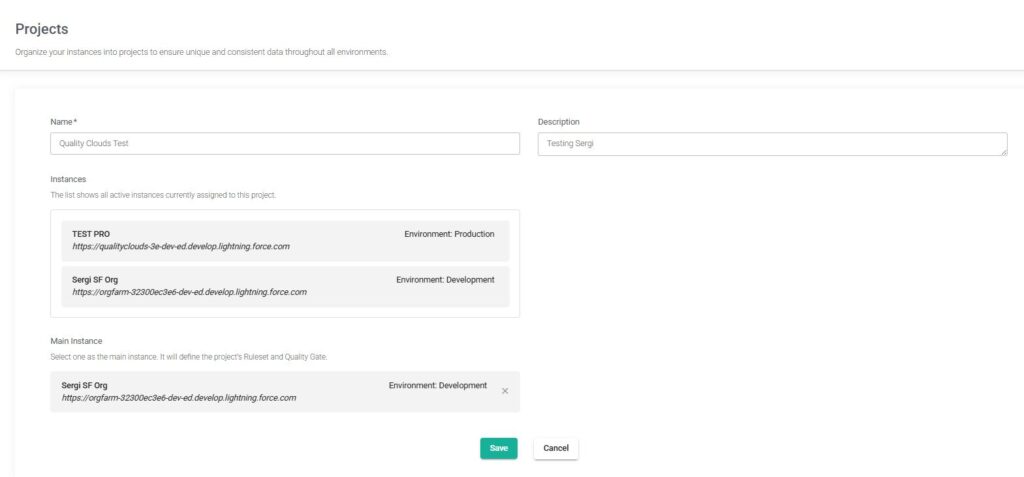
This lesson explains how Projects are used in Quality Clouds to organize and manage multiple Salesforce environments.
In a Salesforce context, a Project acts as a container that groups together related environments such as production orgs, sandboxes, and connected repositories. By organizing these environments under a single Project, teams can manage analysis results, integrations, and developer access in a more structured and scalable way.
One of the main benefits of using Projects is the ability to apply the same ruleset across all orgs or repositories within the Project. This ensures that every environment is validated against the same coding standards, governance policies, and best practices, providing consistent quality control across the entire Salesforce landscape.
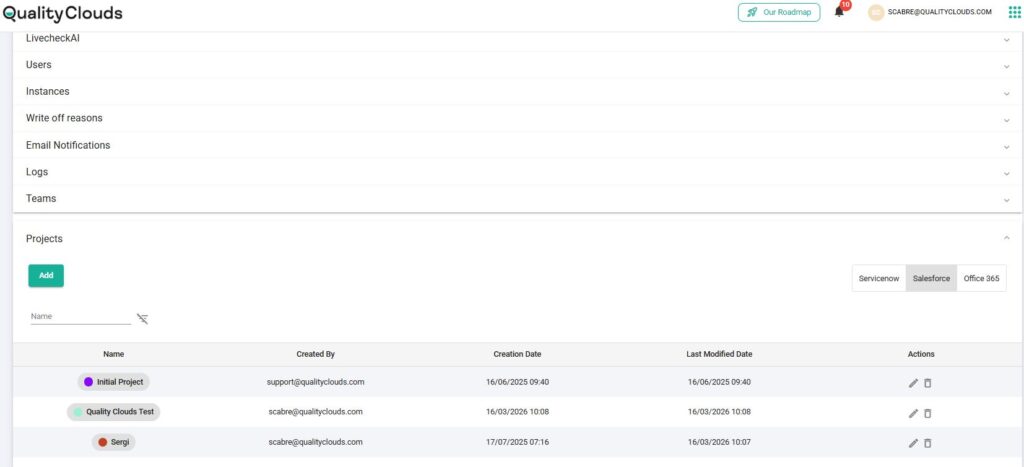
How to Create a Project
Projects are created in the Quality Clouds Admin Portal under Account → Projects, where administrators define the project name and basic configuration. When connecting a new Salesforce org or repository to Quality Clouds, administrators can assign it to an existing Project or create a new one during the onboarding process.
Each Salesforce instance must belong to one Project, which ensures that environments are always associated with a clear governance context. Administrators can also manage multiple instances at once, allowing large teams or partners to efficiently organize many environments across different projects.
By grouping Salesforce environments into Projects, organizations can simplify developer access, centralize environment management, and establish a scalable structure that supports governance and platform growth over time.