

Version 13.0.0 represents a significant step forward in how teams manage quality across the ServiceNow lifecycle. This release introduces a redesigned Quality Center, built to unify development tracking, release governance, and instance health into a single, coherent workspace.
The focus of this version is simple: reduce friction, increase visibility, and automate quality wherever possible.
The new Quality Center brings everything together, giving you full visibility and control across development, releases, and instance health.
Whether you’re writing code, reviewing changes, or monitoring quality, all the tools and insights you need are now in one place.
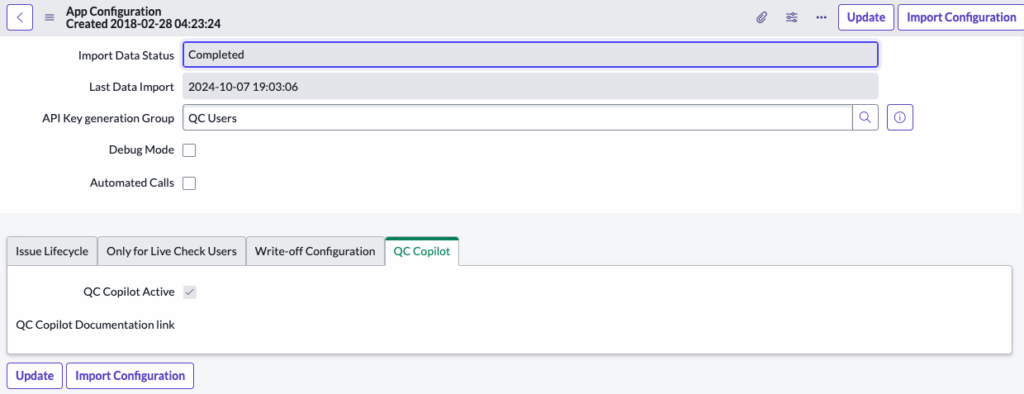
You can now also interact with Quality Clouds directly via chat within the Quality Center, allowing you to ask questions, get guidance, and understand quality issues in context, without leaving your workflow.
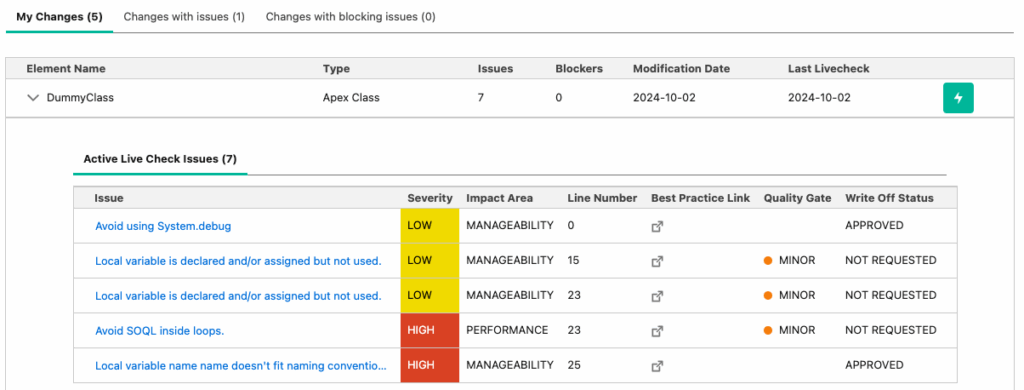
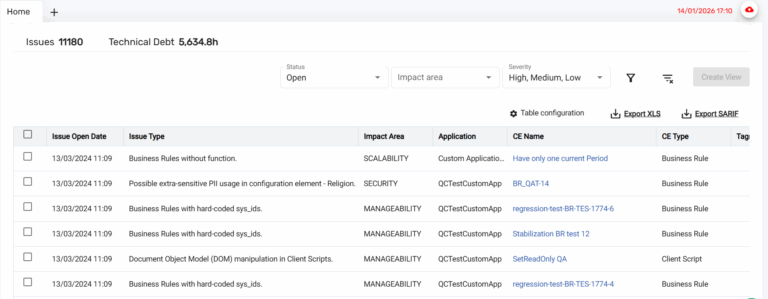
The Development Tracking view is designed as a focused workspace for developers to manage their work efficiently. The view is filtered by the logged-in user, ensuring only relevant data is displayed.
Key capabilities include:
This view brings development data and quality insights together, reducing context switching and improving productivity.
The Release Tracking view provides a clear, data-driven overview of all in-progress update sets.
From a single dashboard, teams can:
This ensures every release is reviewed, validated, and ready for promotion with confidence.
The Instance Tracking view simplifies how teams monitor instance health and stability.
Key features include:
This view provides a real-time picture of instance quality, helping teams identify and address issues early.
Version 13.0.0 expands the app’s automation and coverage to support more adaptive and secure quality management:
Several refinements improve usability, performance, and security:
This release resolves multiple issues to ensure a smoother experience:
Quality Clouds for ServiceNow Version 13 delivers a more connected, automated, and reliable Quality Center, helping customers to maintain quality across their entire lifecycle with less effort and more confidence.
ServiceNow Fix Scripts Inventory Coverage
ServiceNow Fix Scripts are now included in the inventory and analyzed as part of both Livecheck and Full Scan. Issues are identified based on the full set of applicable server-side scripting best practices, including OOTB modification rules, giving customers broader coverage and greater confidence that Fix Scripts meet quality and maintainability standards.
Teams Assignment Rules – Rule-Based Assignment Criteria
Teams assignment rules now support Rule as a new assignment criterion, enabling customers to automatically route issues from Full Scans to the most relevant teams based on the rule that triggered them. This ensures clearer ownership, reduces manual coordination, and accelerates remediation by aligning issues with the teams best equipped to address them.
KPI Accuracy – Exclusion of False Positive Write-Offs
Issues marked with a write-off reason of False Positive are now excluded from all KPIs, including issue counts, Technical Debt, and Quality of Cloud. This ensures that metrics reflect only valid issues, giving customers greater confidence in their KPIs and enabling more accurate tracking of quality, risk, and remediation progress.
New – Salesforce (Visual Force Pages)
Avoid Calling Visualforce Actions on Page Load
Rule ID: SF-AVOID-ACTION-UPON-LOAD
This rule detects Visualforce pages that call actions automatically on page load, which increases exposure to Cross-Site Request Forgery (CSRF) attacks. Enforcing this rule helps reduce security risk by ensuring actions are triggered only through explicit and secure user interactions.
Ensure Correct Encoding in Visualforce Style Tags
Rule ID: SF-AVOID-STYLE-WRONG-ENCODING
This rule checks for correct encoding in <style/> tags within Visualforce pages. Incorrect encoding can lead to Cross-Site Scripting (XSS) vulnerabilities. Applying this rule helps prevent script injection through styles and strengthens front-end security.
Avoid Unescaped User-Controlled Values in Expression Language
Rule ID: SF-AVOID-UNESCAPED-VALUES
This rule identifies unescaped, user-controlled content used in Expression Language (EL). Using unescaped values can result in XSS vulnerabilities. Enforcing proper escaping helps teams protect applications from common injection attacks.
Copy Ruleset in the Admin Portal
Fixed an issue that prevented rulesets from being copied between instances in the Admin Portal. The Copy Ruleset functionality now works as expected, allowing customers to reliably copy rulesets across instances and maintain consistent configurations.
This release includes minor security improvements.
Expanded our suite of automated tests to improve quality assurance and stability.
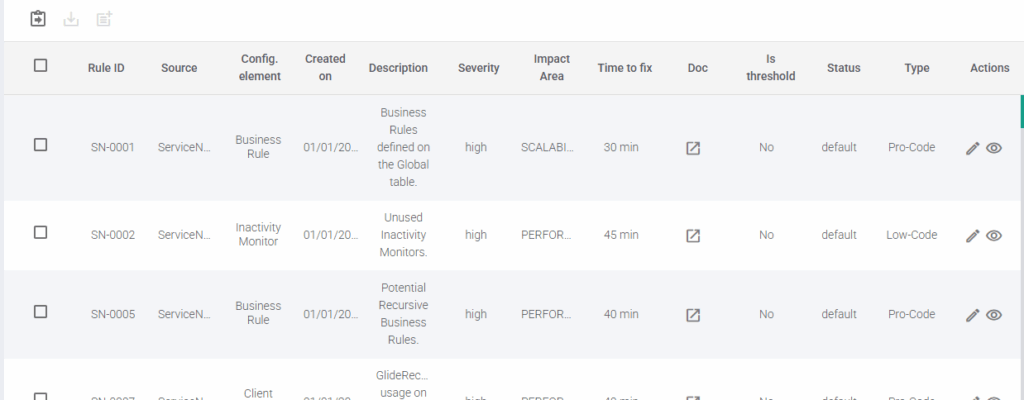
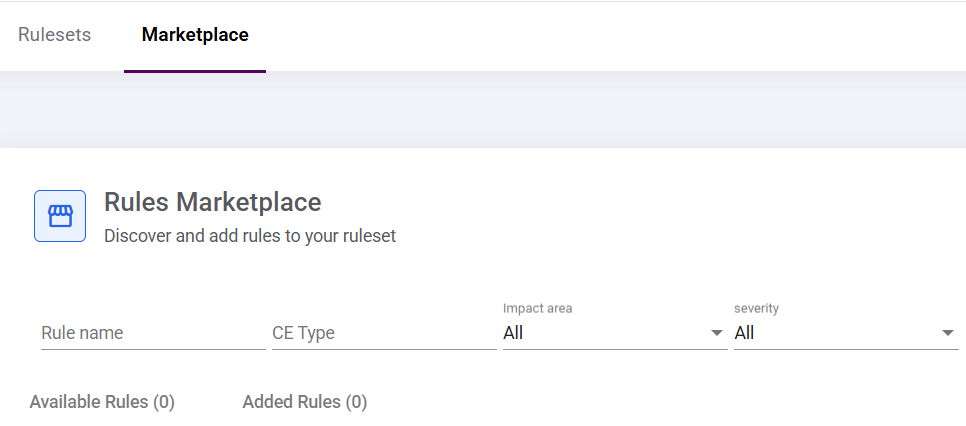
Quality Clouds Rule Builder (Beta)
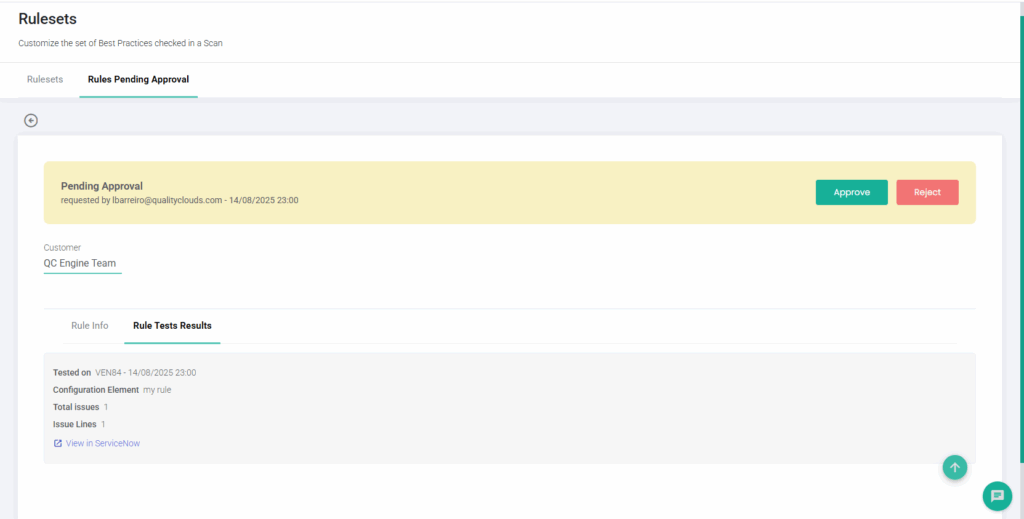
A new Rule Builder add-on is now available, allowing teams to create, customize, and refine rules directly within their own platforms, with no coding required. Access to this feature is controlled through a new permission setting, ensuring it is only visible to authorized users.
Rule creation follows a guided, iterative flow where users can define rules, test them on existing elements, and submit them for approval before they are published to the active ruleset.
To activate the Rule Builder Add-on, please contact your Customer Success Manager or Quality Clouds Support.
Rule Reset – Default Configuration Not Restored
Resolved an issue where a rule could not be reset to its default state after being modified. The reset action now works as expected.
This release includes minor security improvements.
We have resolved various internal issues to enhance system stability further and optimize the user experience.
ServiceNow LivecheckAI Add-on (Quality Clouds MCP)
A new MCP Add-on for ServiceNow is now available, enabling teams to link their ServiceNow development activity directly with Quality Clouds. With this integration, updates and code can be validated automatically through Livecheck, helping maintain consistency, improve quality, and ensure alignment with best practices.
To activate the LivecheckAI Add-on, please contact your Customer Success Manager or Quality Clouds Support.
Flosum – Incorrect Error Message When Launching Scans
Resolved an issue where an error appeared when launching a scan, even though the scan actually started and ran correctly. The message has been updated to reflect the real scan status.
Code Duplication View – Export Error
Resolved an issue where exporting all items from the Code Duplication view resulted in an unexpected error. The export now works correctly across affected instances.
This release includes minor security improvements.
We have resolved various internal issues to enhance system stability further and optimize the user experience.
Salesforce AI Productivity Add-on (Quality Clouds MCP)
The new AI Productivity Add-on introduces the Quality Clouds MCP (Model Context Protocol) server for Salesforce. This capability allows teams using Agentforce Vibes, GitHub Copilot, or other compatible AI coding assistants to connect directly with Quality Clouds and run automated quality checks on AI-generated code using Livecheck. It ensures that all delivered code complies with best practices and organizational standards, helping teams boost productivity while maintaining code quality and consistency across their Salesforce environments.
To activate the AI Productivity Add-on, please contact your Customer Success Manager or Quality Clouds Support.
Scans – Better Memory Handling for More Stable Scans
Scans are now more reliable thanks to improved memory management. The system adjusts memory usage automatically, helping reduce out-of-memory errors and preventing unnecessary scan failures.
This release includes minor security improvements.
We have resolved various internal issues to enhance system stability further and optimize the user experience.
The new AI Productivity Add-on introduces the Quality Clouds MCP (Model Context Protocol) server for Salesforce. This capability allows teams using Agentforce Vibes, GitHub Copilot, or other compatible AI coding assistants to connect directly with Quality Clouds and run automated quality checks on AI-generated code using Livecheck. It ensures that all delivered code complies with best practices and organizational standards, helping teams boost productivity while maintaining code quality and consistency across their Salesforce environments.
To activate the AI Productivity Add-on, please contact your Customer Success Manager or Quality Clouds Support.
✅ Code Duplication View – Active/Inactive Filter
The Code Duplication view now allows filtering by Active or Inactive elements in ServiceNow and Office 365, enabling admins to focus on relevant code and perform more precise duplication checks.
The Quality Clouds MCP feature ensures AI code assistants like GitHub Copilot follow your organization’s development, governance, and security standards. It validates AI-generated code in real time via the Quality Clouds MCP server, automatically enforcing quality, security, and compliance rules across platforms such as ServiceNow, Salesforce, and Microsoft 365.
📚 Learn More
To explore the full details of this release, follow this article:
👉LiveCheck AI (via MCP)
Salesforce AI Productivity Add-on (Quality Clouds MCP)
The new AI Productivity Add-on introduces the Quality Clouds MCP (Model Context Protocol) server for Salesforce. This capability allows teams using Agentforce Vibes, GitHub Copilot, or other compatible AI coding assistants to connect directly with Quality Clouds and run automated quality checks on AI-generated code using Livecheck. It ensures that all delivered code complies with best practices and organizational standards, helping teams boost productivity while maintaining code quality and consistency across their Salesforce environments.
To activate the AI Productivity Add-on, please contact your Customer Success Manager or Quality Clouds Support.
Rules Management – Automatic Quality Gate Categorization
Rules are now automatically categorized based on the active Quality Gate configuration. Each rule is labeled as Blocker, Minor, or Legacy according to its configuration and activation date. This information is displayed in a new column within the Ruleset table, giving users clearer visibility of rule criticality and improving overall quality governance.
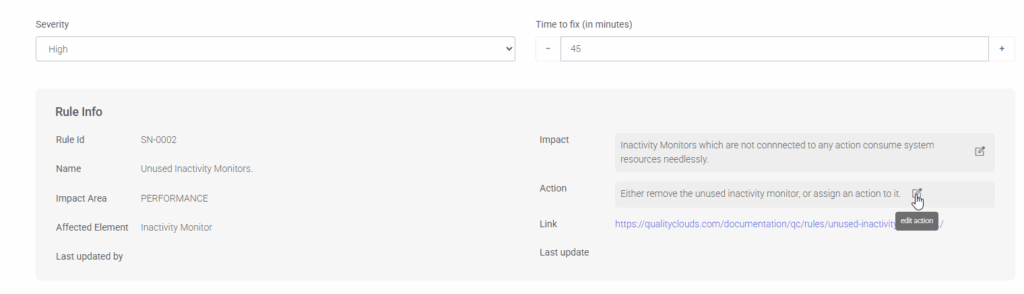
Rules Management – Edit Rule Impact and Action from UI
Admins can now edit the text of a rule’s Impact and Action directly from the Ruleset UI. This makes it easier to customize rule descriptions and align them with internal best practices or guidance provided to AI Agents for fixing issues and reducing technical debt.

Admin Tables – Project Filter Support
Project filters are now available across admin tables, making it easier to view and manage data by project.
Access Issues for Project User Role
Fixed a problem that prevented users with the Project User role from properly accessing issue lists and related scan data. Access now works as expected without requiring additional permissions.
This release includes minor security improvements.
We have resolved various internal issues to enhance system stability further and optimize the user experience.
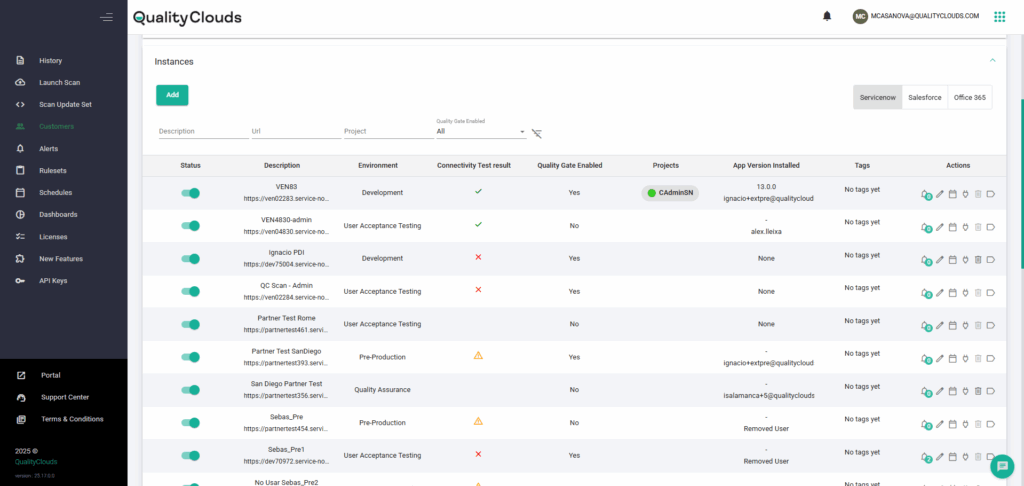
✅ Streamlined Instance Management
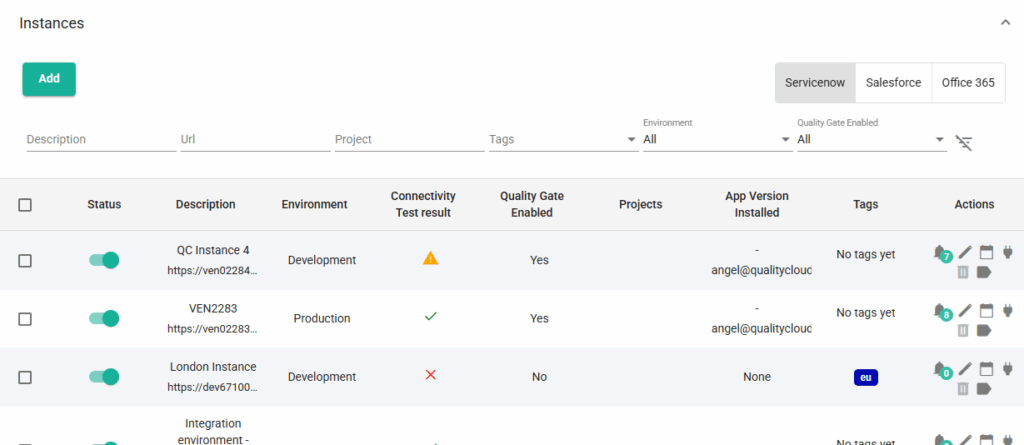
The redesigned Instances Table provides administrators with greater clarity and control over instance management. Key enhancements include:
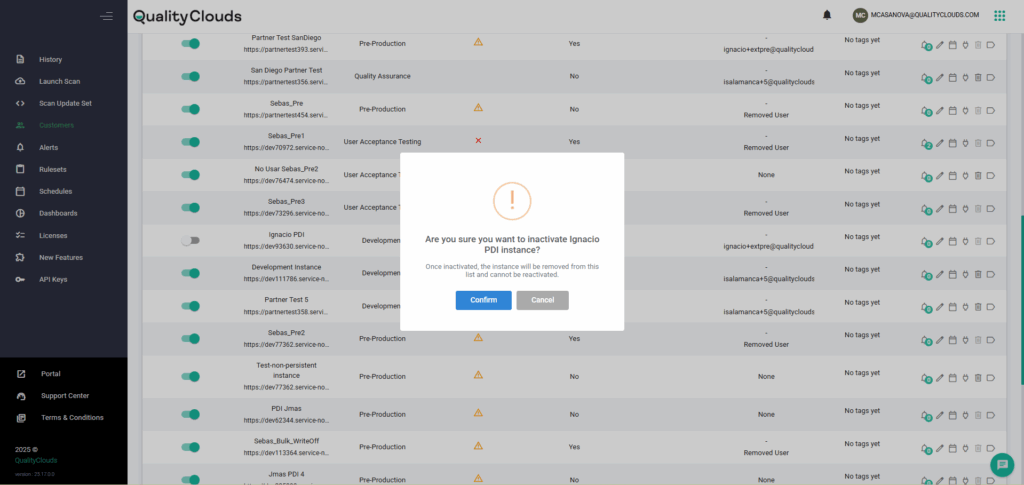
⚡ Additionally, a new Inactivation Workflow improves lifecycle management.
🎯 Administrators can now mark instances as inactive directly from the table. Once confirmed, these instances are automatically removed from view and cannot be reactivated—ensuring a focused, clutter-free workspace.
Salesforce Inventory – New AI and DataCloud Elements
The Salesforce Inventory now includes a new AI Agent Template and the first three Data 360 elements (soon to be rebranded as Data360): Data Connector, Data Source Object, and External Data Source. These additions provide customers with enhanced visibility into their Salesforce environments, enabling more complete assessments and better oversight of data-related configurations.
Instances Table Project Management
The Instances Table now supports bulk project management across Salesforce. Admins and Partners can assign or reassign multiple instances to a project in a single action, reducing manual effort and improving governance.
New – ServiceNow
Script Includes marked as Client Callable should use GlideRecordSecure instead of GlideRecord
Rule ID: SN-SI-GLIDERECORDSECURE
This rule flags Script Includes marked as Client Callable that use GlideRecord instead of GlideRecordSecure. Using GlideRecord in this context can bypass Access Control Lists (ACLs), potentially exposing or modifying data without proper authorization. Updating to GlideRecordSecure ensures ACL enforcement and protects against unauthorized data access.
Improved – ServiceNow
User Criteria with hard-coded sys_ids.
Rule ID: SN-0450
The rule that flags User Criteria containing hard-coded sys_ids has been updated to exclude out-of-the-box HR Criteria automatically generated by ServiceNow. This adjustment removes false positives and ensures more accurate detection of hard-coded sys_ids. Existing issues related to HR Criteria will be closed automatically after this update.
This release includes minor security improvements.
We have resolved various internal issues to enhance system stability further and optimize the user experience.
The Salesforce Inventory now includes a new AI Agent Template and the first three Data 360 elements (soon to be rebranded as Data360): Data Connector, Data Source Object, and External Data Source. These additions provide customers with enhanced visibility into their Salesforce environments, enabling more complete assessments and better oversight of data-related configurations.
Quality Clouds Roadmap
A link to the QC Roadmap is now available in the Admin and BI portal headers, giving direct visibility into upcoming features and improvements.

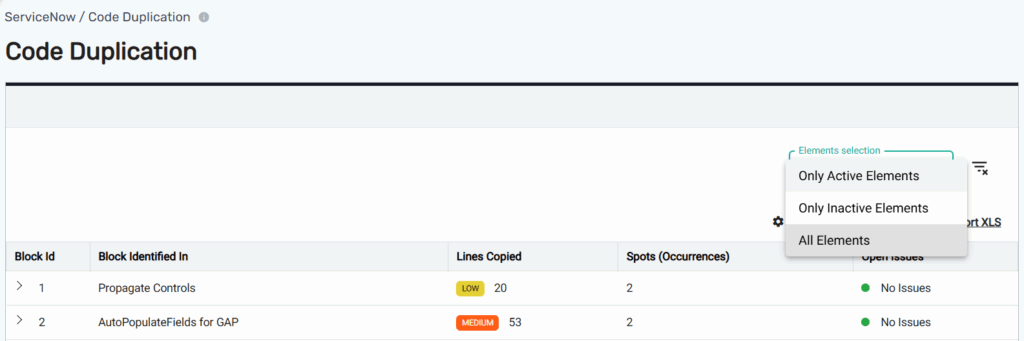
Code Duplication View – Active/Inactive Filter
The Code Duplication view now supports filtering by Active and Inactive elements across ServiceNow and Office 365. This enhancement helps Admins focus their analysis on relevant code segments, making duplication checks more accurate and actionable.
Instances Table Project Management
The Instances Table now supports bulk project management across ServiceNow and Office 365. Admins and Partners can assign or reassign multiple instances to one or more projects in a single action, reducing manual effort and improving governance.
ServiceNow – Issue Detail – Forms with Duplicate Fields
The Issue Detail view now highlights which forms and fields are affected by the Forms with Duplicate Fields rule for all clients. This helps Admins quickly identify and resolve duplication issues, improving form accuracy and data consistency across the platform.
New – ServiceNow
Script includes marked as Client Callable should contain a Access Control Role
Rule ID: SN-SI-ACCESS-CONTROL-ROLE
This rule flags Script Includes marked as Client Callable that do not have an associated Access Control Role. Adding proper role restrictions prevents unauthorized client-side execution of server-side code and protects sensitive logic from exposure.
New – Salesforce
Limit the Number of Actions per Topic
Rule ID: SF-AVOID-TOO-MANY-ACTIONS-PER-TOPIC
This rule flags AI Topics with more than 15 actions. Exceeding this limit can increase latency, slow down response times, and reduce overall user experience.
This release includes minor security improvements.
We have resolved various internal issues to enhance system stability further and optimize the user experience.
Peer Review view has been optimized for faster loading, improving overall performance for users.
✅ ServiceNow OOTB Service Updated for Zurich Release
The out-of-the-box ServiceNow service has been upgraded to fully support the Zurich release, ensuring compatibility and smooth operation with the latest platform features.
The Quality Clouds integration for Flosum allows Salesforce teams to embed automated quality and governance checks directly into their development and deployment pipelines. It enables seamless scanning of Flosum repositories to analyze code, metadata, and configurations without leaving the Flosum environment.
Please follow this articles to
🔗 Connect a Flosum org in Quality Clouds Admin Console
⚙️ Configure the Flosum package in Salesforce
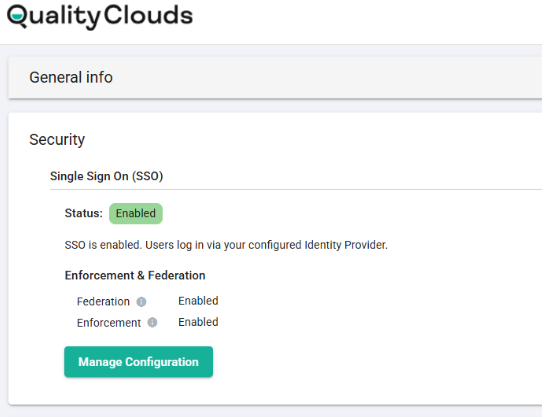
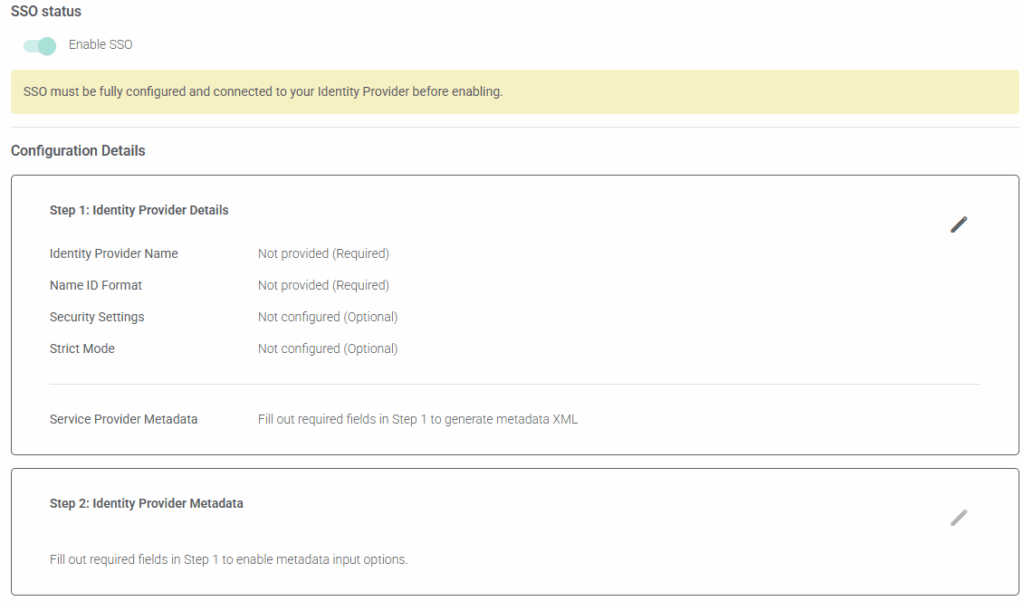
Self-Service SSO Configuration
Customer Admins can now configure and manage SSO directly within the Admin Portal using a step-by-step guided setup. This update gives organizations more control over secure access while minimizing the need for support involvement.
🚀Target Audience: Customer Admins, Security Teams, IT Teams
🌟 Why this matters:
Organizations can align authentication processes with their own security standards, making access management more efficient and secure.
✅ What is changing for users:
Version 12.1 builds directly on the foundation of 12.0 (released June 27, 2025), keeping all its capabilities while adding important improvements in security, usability, and flexibility.
The main highlight is the new Auth Token model, which replaces API Keys with a secure, scalable, and automated authentication system. This simplifies user management, reduces admin workload, and ensures centralized control, all without losing any existing functionality.
🔑 Key Benefits & Features
Stronger security with token-based authentication
Flexible, Non-blocking Quality Gates
Enhanced Quality Center navigation and quick links
Smarter LiveCheck with batch updates, error messaging, and conflict alerts
Agile 2.0 improvements for bulk exports and role-based access
Configurable Peer Review and Write-Off functionality
QC Copilot code comparison enhancements
HealthScan issue imports into ServiceNow
General improvements for consistency, diagnostics, and performance
With 12.1, teams gain better security, streamlined workflows, and enhanced flexibility, ensuring Quality Clouds continues to drive governance and quality across ServiceNow environments.
📚 Learn More
To explore the full details of this release, follow this article:
👉 Transition from API Key to Auth Token
ServiceNow Zurich Release Support
The ServiceNow scanning service has been upgraded to fully support the Zurich release, ensuring compatibility with the latest platform features. Modified OOTB elements impacted by the Zurich release are now also visible in the Upgradeability View, giving Admins better visibility into upgrade readiness and making it easier to track and manage ServiceNow version support.
Instances Table Filtering and Tag Management
The Instances Table is now easier to navigate and organize. Admins can filter instances by environment or tags and manage tags in bulk across multiple instances, making it faster to keep environments structured and up to date.
New – ServiceNow
Avoid using ‘gr’ as a variable name in scripts
Rule ID: SN-AVOID-GR-VARIABLE-NAME
This rule flags scripts using ‘gr’ as a variable name. Using descriptive names improves readability, reduces conflicts, and makes custom code easier to maintain.
New – Salesforce
Flows should always include a description
Rule ID: SF-AVOID-FLOW-WITHOUT-DESCRIPTION
This rule flags Flows without a description. Providing a clear description makes Flows easier to understand, maintain, and troubleshoot.
This release includes minor security improvements.
We have resolved various internal issues to enhance system stability further and optimize the user experience.
📚 Learn More
To explore the full details of this release, follow this article:
👉 Release 25.18
The ServiceNow inventory has been expanded to include AI Agents, AI Tools, AI Use Cases, AI Skills, and AI Prompts as new Configuration Element Types. This enhancement provides greater visibility and deeper analysis of AI-related configurations and customizations, helping teams better track, manage, and govern their AI assets.
👉 Check the list of Configuration Elements scanned in ServiceNow
✅ San Diego and Tokyo Compatibility
Our latest update introduces full compatibility with the San Diego and Tokyo releases, ensuring support for organizations operating on these versions.
🚀Enhanced Logging and Error Handling
We’ve strengthened system reliability by improving logging and error handling. These enhancements make it easier to identify issues quickly, streamline troubleshooting, and maintain consistent performance.
📚 Learn More
To explore the full details of this release, follow this article:
👉Field Analysis versions
✅ Salesforce – Unified Onboarding, Authentication & Project Configuration
We’ve introduced major improvements to the Salesforce developer experience, creating a secure, unified flow for identity, authentication, and project configuration across all Quality Clouds tools.
🚀 Why this change?
To replace fragmented API key setups with a centralized model that simplifies access, strengthens security, and enforces consistent project governance.
🌟 What’s new?
Bulk Onboarding – Admins can add developers individually or in bulk from the Admin Portal.
Personal Credentials – Developers activate QC credentials via email, used across Salesforce apps and the VSCode plugin (not the QC Portal).
Authentication Flow – Developers log in directly with their credentials, eliminating shared keys.
Project Assignment – Developers select a Project on first login; each Project groups instances under a Ruleset and Quality Gate, with a Main Instance defining configuration.
🎯 Impact:
Simpler onboarding, stronger access control, and consistent governance—laying the foundation for future scalability.
📚 Learn More
To explore the full details of this release, follow this article:
👉 Developer Role
👉 Projects
📚 Learn More
To explore the full details of this release, follow this article:
👉 Release notes 25.17
🚀New Metadata Security Rules
We’ve introduced a new set of Metadata Security Rules designed to strengthen governance around sensitive configuration changes in Salesforce.
These rules require proper review and approval before deploying critical elements such as IP ranges, API exposure, and data access via Profiles and Permission Sets.
By adding this layer of oversight, the update helps safeguard access controls, protect system integrity, and improve the overall security posture.
🚀 Introducing Projects for Salesforce, ServiceNow, and Office 365
We’re excited to announce Projects—a new way to organize your instances within a unified structure. With Projects, customers can group related instances together, making it easier to manage quality settings and laying the groundwork for future Project-based capabilities.
⚠️ Important: If you’re using the write-off propagation add-on, propagation will now follow the Project assignments of your instances.
Learn More
To explore the full details of this release, follow this article: Projects
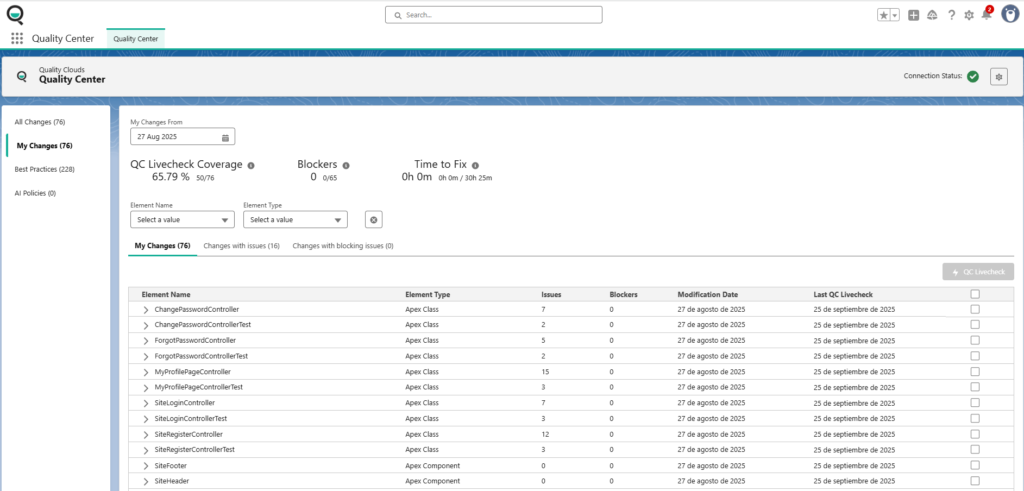
✅ Quality Center App Now Available
The Salesforce Quality Center app is now live for customers. This first release introduces a guided onboarding experience designed to support both new and existing users:
🌟 Who is this for?
Admins, Platform Owners, and Developers working with Quality Clouds.
🎯 Why it matters
The Quality Center provides a centralized hub for managing code quality directly within Salesforce. It enables teams to track progress, measure quality using actionable metrics, and implement improvements effectively.
⚡ Impact on users
With Quality Center, users gain continuous visibility into the quality of their development work. Integrated tools help detect issues early, apply best practices, and maintain high code standards—all from one place.
📚Learn More
To explore the full details of this release, follow this article:
👉 Quality Center for Salesforce
Quality Clouds now integrates with GitHub Actions, allowing scans to be triggered on both commits and pull requests. This enhancement strengthens CI/CD pipelines by improving visibility and accelerating feedback loops.
🔑 Key benefits:
🔐 Who is this for?
Developers and DevOps teams working with GitHub.
🎯 Why it matters
By detecting issues earlier in the development lifecycle, this integration provides fast, actionable feedback on code quality.
⚠️ Impact on users
Developers gain immediate insight into blockers and non-blockers during code reviews, enabling faster fixes and more efficient development workflows.
📚 Learn More
To explore the full details of this release, follow this article:
👉 GitHub Integration
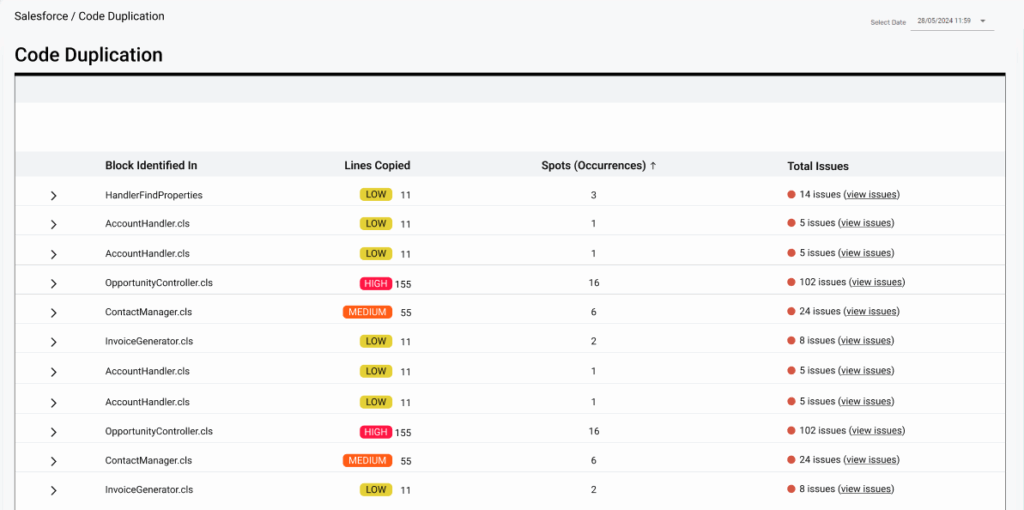
✅ New Code Duplication View
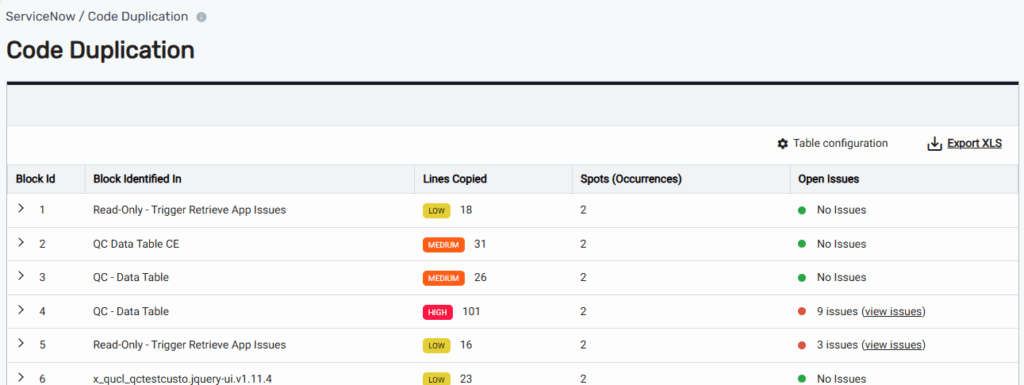
We’ve introduced a new Code Duplication View that makes it easier to spot and resolve repeated code. The view organizes duplication into structured blocks and highlights related issues for quick analysis.
🚀 Who is this for?
Platform Owners and Admins working in the QC Portal.
🎯 Why it matters
This feature provides a clear, actionable overview of duplication patterns, helping teams detect and address repeated code more efficiently while understanding its impact.
🌟 Impact on users
Users can review duplication in grouped blocks, expand entries to see detailed occurrences, and access a pop-up with linked issue information—all in one place. This streamlines the code review and refactoring process, saving time and improving quality.
📚 Learn More
To explore the full details of this release, follow this article:
👉 Code Duplication View
✅ Salesforce – Quality Clouds VSCode Extension
The QC Copilot is now available in the Quality Clouds VSCode extension, enabling developers to receive issue-specific recommendations and apply fixes directly within their editor.
🚀 Who is this for?
Developers using the Quality Clouds VSCode extension to analyze and resolve issues in real time.
🎯 Why it matters
By integrating QC Copilot guidance into the development workflow, developers can resolve issues faster and more efficiently without switching tools.
🌟 Impact on users
From within VSCode, developers can:
All of this can be done seamlessly without leaving the editor, improving both speed and productivity.
📚 Learn More
To explore the full details of this release, follow this article:
👉 QC Copilot in VSCode Extension
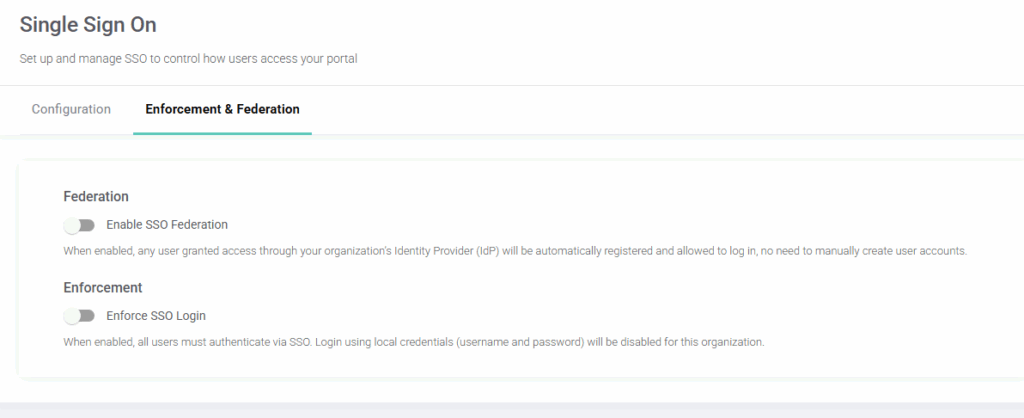
🚀 Streamlined Onboarding with SSO Federation
Admins can now enable SSO Federation to automatically create user accounts when employees log in through their organization’s Identity Provider (IdP).
🔐 Stronger Security with SSO Enforcement
SSO Enforcement lets admins require authentication exclusively via the organization’s IdP, disabling local logins.
📚 Learn More
To explore the full details of this release, follow this article:
👉 SSO Federation
👉 SSO Enforcement
✅ New AI Quality Expert Agent
We’re introducing an AI Assistant integrated with our documentation, giving users quick, direct access to product information.
🚀 Who is this for?
Support teams, platform owners, and users looking for fast answers to product-related questions.
🎯 Why it matters
This feature improves self-service support and makes product knowledge more accessible.
🌟 Impact on users
Users can interact with the AI Agent directly within the platform to quickly find answers and guidance on Quality Clouds features and processes.
🧭 What’s next
Future versions will expand the AI Agent’s capabilities to help resolve technical issues. Stay tuned for updates in upcoming release notes.
✅ Integration with Salesforce DevOps Testing
Quality Clouds is now officially recognized as a Salesforce Test and Quality Provider with a new integration package available on the AppExchange. This integration connects Quality Clouds with Salesforce’s DevOps Testing framework, embedding automated quality checks directly into development workflows.
🌟 Who is this for?
Salesforce teams using DevOps Center to streamline testing in their release process.
🎯 Why it matters
Supports Salesforce’s DevOps Testing strategy by making it easier to ensure quality and governance at every stage of development.
⚡ Impact on users
Teams can install the AppExchange package to seamlessly integrate Quality Clouds and leverage automated analysis throughout their DevOps lifecycle.
📚 Learn More
To explore the full details of this release, follow this article:
👉 DevOps Testing Integration
✅ Support for ServiceNow Yokohama Release
🚀 Quality Clouds now fully supports the ServiceNow Yokohama release, ensuring seamless integration and enhanced upgradeability insights. Key updates include:
Upgradeability Impact Reporting: Identifies and reports OOTB modifications affected by the Yokohama release on the Upgradeability dashboard.
Enhanced Inventory Tracking: Captures modified Yokohama elements in QC inventory for better change governance.
Issue Identification: Detects and reports issues related to modified Yokohama elements.
✅ A new rule has just been released
🚀 Virtual Agent Topic – Avoid Unauthorized Creation
Rule ID: AVOID-UNAPPROVED-VIRTUAL-AGENT-TOPIC
This rule helps manage the creation of Virtual Agent topics by warning users when topics are created outside of governance processes. It is added to the default ruleset in an ignored status, allowing teams to enable it as needed.
📚 Learn More
To explore the full details of this release, follow this article:
👉Avoid Virtual Agent Topic Creation
✅ Release Check Agent provides Salesforce teams with instant release visibility, highlighting blockers, compliance gaps, and technical debt before deployment—so teams can go live with confidence.
📚 Learn More
To explore the full details of this release, follow this article:
👉 Release Check Agent Integration
✅ We have improved navigation and usability, ensuring screens in the Account section maintain context after actions and pagination remain consistent across tables.
🚀Updates include better filtering, sorting, and improved labeling for a more seamless experience
📚 Learn More
To explore the full details of this release, follow this article:
👉 Navigation between the Portals
🚀 Here are the newly released rules that have been released:
✅ Salesforce – OperationWithHighCostInLoop
Rule ID: SF-AVOID-OPERATION-WITH-HIGH-COST-IN-LOOP – Prevents calling high-cost performance methods inside loops, as repeated calls can slow down application performance, especially in large organizations. To optimize efficiency, extract these method calls outside the loop and execute them only once.
✅ Salesforce – AvoidNonRestrictiveQueries
Rule ID: SF-AVOID-NON-RESTRICTIVE-QUERIES – Prevents using unfiltered SOQL or SOSL queries, which can retrieve excessive data, leading to governor limit exceptions and impacting application stability. To optimize performance, always apply filters to limit the data retrieved.
✅ Salesforce – QueueableWithoutFinalizer
Rule ID: SF-AVOID-QUEUEABLE-WITHOUT-FINALIZER – Prevents using the Queueable interface without a Finalizer, ensuring proper error recovery. Without a Finalizer, failures in Queueable actions can cause unhandled errors. To improve reliability, attach a Finalizer using System.attachFinalizer(Finalizer f).
🚀 We’ve enhanced XLS exports to make sure files reach the right recipients.
⚡Now, when exporting issues, a notification will display the recipient’s email address, allowing you to confirm before sending and avoid accidental misdelivery.
This update gives you greater visibility and control, ensuring a more reliable export process.
🚀 As a Partner, you can now manage multiple accounts using the same email address while having unique usernames for each account.
🔐 This update enhances flexibility in account management and ensures secure password recovery using both the email and username.
✅ What’s New in This Release
This update delivers UX improvements, stability enhancements, and bug fixes across Quality Center, CoPilot, and LiveCheck. Install now from the ServiceNow Store.
🚀 Quality Center (Beta)
🔌 CoPilot (Beta)
⚡ LiveCheck
📚 Import Issues
🌟 Other Fixes & Enhancements
Improved app preservation post-clone (system properties included)
Added configuration element link for CE Type Inline Scripts
✅ We’re upgrading to PMD 7.8.0 on January 29th. This update improves detection accuracy, reduces false positives through refined rules and advanced analysis, and lays the groundwork for more powerful rules in future releases.
⚠️ Please note: this upgrade will not change the Quality Clouds Ruleset—no new rules will be added, and your ignored rules remain unaffected.
🚀 We are strengthening Debt Manager by expanding information visibility, refining access, and enabling more effective user actions such as:
Admins will enable or disable Write-Off permissions per user, ensuring only authorized users can see and perform Write-Off actions.
The “Also Spotted In” tab will display an Issue ID column, making it easier to track the same issue across environments.
✅ We are working to implement more rules related to strengthening security, enforcing governance, and ensuring compliance across environments. They are designed to:
More to come soon!
Make AI Code Assistants follow your rules – from validation to fixes, in real time.
AI code assistants accelerate development, but risk drifting into code that violates your organization’s rules, platform limits, or architectural conventions.
LivecheckAI adds the missing governance layer: Real-time & fully embedded in your workflow.
✅ Real-Time Validation
Every AI-generated line is instantly checked.
⚡ Automatic Fixes
Naming issues, complexity, and documentation gaps are corrected in the background.
🧠 Smarter Peer Reviews
Reviewers focus on functionality and architecture, while standards are enforced automatically.
🚀 Productivity + Compliance
Developers code faster with AI, knowing quality and governance are built in from the start.
Your smart, conversational assistant inside the Quality Clouds platform that helps you to:
💬 Plain-Language Rules
Create, test, and launch configuration rules without coding.
🛡️ Instant Governance
Set guardrails dynamically across teams, tools, environments, and partners.
⚡ No Slowdowns
Enforce standards without impacting delivery speed.